
Electronic signature device configuration
Clicksign Plus and Clicksign Pro lets to you choose between the signature you will use.
These devices represents digital certificates on hard disk or smart card. Inside of the hard disk certificates there is the particular case of the Windows installed certificates. To sign with those certificates you have select the "Windows Crypto Api" device.
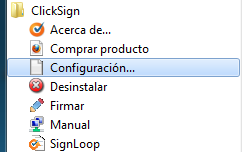
1. Select the ClickSign menu entry "Setup"
2. The following dialog will be shown:
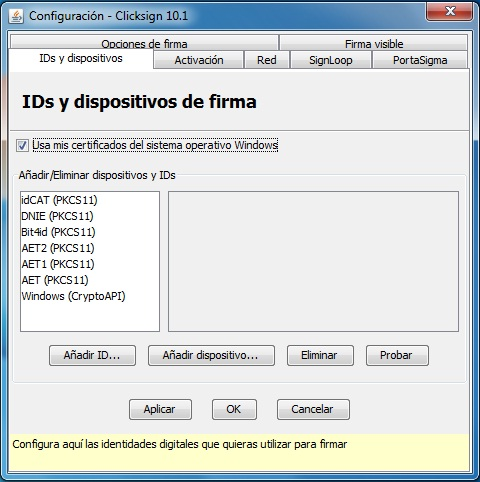
Add ID
This option lets to you add software digital certificates, most commonly PKCS#12 formatted. We just have to browse by the file system and select the certificate.
Add electronic signature device
This option lets add criptographic devices (Smartcards or Tokens). For example, ClickSign is compatible with some of their by default but is possible to add any other developed over PKCS#11 standard. Just select the DLL provided by the device manufacturer.
Delete
This option lets delete any listed device. Just select the device and press "Delete" button.
Test
This option lets test if the electronic signature device works. Just select the device and press "Test" button. A dialog will be shown with the certificate behavior.

 Sign, send, and get back your signed documents